Australian Scrapbook Ideas ask me to do a feature for their October Magazine. They asked for three layouts with a Paris theme. I hope to visit Paris one day but as yet have not made it. So it was a case of asking friends for their holiday photos. Graphic 45 are featuring my work on their blog along with some photos of the Graphic 45 Ladies trip to Paris early this year. Make sure you visit their blog and leave a comment to go into the draw to win their weekly prize. Also leave a comment here on mine and I will choose someone to win a set of Eiffel Tower chipboards.
I love this layout of the Eiffel tower. I love using lots of layers on my work. I like to think that each time you look at it you find something else. As it has lots of layers and elements you need to be careful when following my instructions. I always measure twice and cut once!
Just Paris
 1 - Cut your cream bazzill to 27.5cm x 27.5cm and tape it to the middle of your “Curtain Call” print paper.
2 - Cut your black Bazzill to 25.5 cm x 25.5 cm and adhere it to the middle of your cream Bazzill. 3 - Cut Postage print paper to 24.5cm x 24.5 and adhere it to your black Bazzill with photo corners.
4 - You need to cut two elements from “the Cinema” print paper. The first one is the film strip with the images on it. Cut it the whole length and then trim it back to 24cm long and mat it with black Bazzill. Cut a narrow piece of black Bazzill 4cm wide and tape it on top of the film images. Add gold sticky ribbon to the middle of the black Bazzill and in the middle. Once you have cut out this piece, cut the film strip with numbers on it, you will need to use both pieces. Mat the two pieces with black Bazzill.
5 - From the sheet you will need to cut the image with the couple with the man with a sword, leaving some of the black edge on it. Cut a piece of cream Bazzill 7.5 cm x 15cm. Mat this piece with black Bazzill. Add the image of the couple to the middle of the cream Bazzill. Cut a small piece of the print paper to 2.5cm wide and 10cm long. Back tear along one edge of it, along the long side and ink. Attach it to the bottom of the image piece and wrap edges around to the back. Add black ribbon over the top and wrap a piece of organza ribbon and tie it to the front with a knot to the right side of the piece.
6 - Cut a piece of yours truly to 5cm x 9cm and adhere it over the top of the couple using black photo corners.
7 - Ink Paris title and Eiffel tower with black ink. Place Eiffel tower on to cream cardstock and draw around it and cut out the shape. It needs to be a little bit bigger than the chipboard shape. Glue the two together and attach it to the red print with foam tape as shown. Add clock to the middle of Eiffel Tower. For the rest of the page:
1 - You need to adhere your print paper stripe with gold sticky ribbon to the bottom of your print paper; it needs to be about 4cm up from the bottom of the print. Place two pieces of film strip with numbers on an angle running from the top of your page to the bottom attach them to each other. Once happy with the angle you can tape them down.
2 - You can add your rectangle with the Eiffel tower to your page using foam tape. Use the photo of the layout for a guide for placing it.
3 - Cut three Eiffel tower stamps from your Tour de France print paper and mat them with black Bazzill. Adhere them on top of the number film strip at the top of your page. The left and right one go on with tape but use foam tape on the middle one.
4 - Punch a circle of black Bazzill and adhere your bottle cap disk on to it. Push it onto the memo pin. Tie a piece of organza ribbon to pin and insert into the foam tape at the top of your rectangle piece with the Eiffel tower.
5 - Check that your matted photo will fit and adhere it to your page using photo corners.
6 - Add title and brads to finish.
Tip Use photo corners on your work to give it a classic look. Use lots of elements to add interest and layer elements using foam tape to add dimension.
Supplies:
Graphic 45Graphic 45 Curtain Call Collection - Curtain Call G4500317Graphic 45 Curtain Call Collection - Tour de France G4500324Graphic 45 Curtain Call Collection – the Cinema G4500323Graphic 45 Communique Collection – Postage G4500067Graphic 45 Domestic Goddess Collection – Yours truly G4500124Imaginarium designs chipboard:
Paris Title IDW0040, Eliffel Tower IDS0041,
Other2x Cream Bazzill2x Black Bazzills, 3L Photo corners, Green Tara gold sticky ribbon.Vandoros black ribbon and Gold organza ribbon, Clock, Tim Holtz Memo pins, Bottle cap Images Paris Passport, Making memories decorative brads, Foam tape, double sided tape and glue.
Snap Shots of Paris
For this layout I ask my "Friday fortnight friend" Debs for some of her photos. She had just returned and had 100's of photos. This meant I had lot of photos of Paris to play with. I decide to do a whole layout using as many photos as I could. I love this print paper “Moulin Rouge” from Graphic 45’s Curtain Call I decided to use it as the background paper for my layout.
 I printed all the photos in a small size and cut them to fit the stamps which were printed on the paper. I had beautiful Eiffel tower chipboard from Imaginarium designs and used it as the centre of my layout. The page came together really well and shows 20 snap shots of Paris
 1 - Using Graphic 45’s Moulin Rouge as your base. Work out how many of the squares you want to cover. I left 4 squares uncovered without any photos. Cut the photos to 2.5cm x 3.6cm, + four photos 2.8 x2.8 cm for the corners. Lay your photos on the squares and move them around until you are happy with the layout. Once happy adhere them to the page.
2 - Cut your black Bazzill to 22.1 cm x 22.1 cm and tape it to the middle of your print paper. It should fit nicely inside the square. Cut your cream bazzill to 21.5cm x 21.5cm place tape in the middle of the paper and adhere it to your black Bazzill. Don’t tape down the sides as you will need to wrap ribbon around the edges later on. Add photo corners to the cream corners and stick them down.
3 - Cut your Tour de France print paper to 15cm x 19cm with the stripes running down. Ink around the edges and adhere it to your cream Bazzill with the same amount of space at the top and bottom and 1cm in from the right side of the cream bazzill. Add a piece of black stitched ribbon across the top of the stripe and wrap it around to the back of the cream on the right side of the page.
4 - Cut your Paris Post print paper to 9cm x 20.5cm and adhere it to the cream Bazzill over the top of the stripe and ribbon. It needs to go 1 cm in on the cream from the left side with the same amount of space at the top and bottom. . Add black brads to each corner.
5 - Add some sticky ribbon across the page over the top of both print papers and wrap it around the back of the cream on both sides. Use the photo as a guide as to where to place it.
Cut the Eiffel tower print from your tour de France paper and mat it with black Bazzill. Add four photo corners and attach to the page as shown (above).
Ink Eiffel tower and Paris title in black. Paint the miniature title and Edward ornament with a silver paint dabber. (use the photo below as a guide)

1 - I used some alphas, which I inked with vintage photo distress ink and stamped with a French writing stamp and black ink over the top.
2 - Push out the circle letters from the Domestic Goddess to spell “snap” and place an epoxy dot over the top.
3 - Once the silver paint is dry, glue the tinies Paris title onto the black title.
Tie a ribbon through the “wander” disk and glue it to the middle of the painted Edward ornament.
4 - Place all the titles and the Eiffel tower to your page and check that all the elements fit. Once you are happy, glue the Eiffel tower down to your page and glue the silver element to the Eiffel tower. Glue title and words to your layout. Supplies:
Graphic 45Graphic 45 Curtain Call Collection - Moulin Rouge G4500325Graphic 45 Curtain Call Collection - Tour de France G4500324Graphic 45 Domestic Goddess Collection - Alphabet G4500131Graphic 45 Curtain Call Collection - Tour de France G4500324Graphic 45 Transatlantique Collection - Paris Post G4500090
Imaginarium designs:Paris Title (E), IDS0041 67mmx93.5mm, Paris Title Tinies IDT0024, Eiffel Tower Large IDS0040, Alphas Lowercase IDALC0001, Alphas Uppercase IDAUC0001, Edward Ornament IDFL0012 (2 per board)
Black Bazzill, Cream Bazzill, Tim Holtz Philosophy Tags “wander”, 3L photo corners, Large Epoxy Dots, Black Doodle Bug Brads, Green Tara Black sticky ribbon.Vandoros black stitched ribbon and copper organza ribbon.Double sided tape, foam tape and glue
The Paris Opera House.

For this layout I ask my special Friend Meg for some of her photos. Her husband Dave took the photos. Once I had copies of his photos and saw this one I was captivated. I love this photo, it shows the glorious rich colours and the opulence of opera house, which was part of the great reconstruction of Paris during the second Empire initiated by Emperor Napoleon III . The Opera house was started in 1861 with the laying of a foundation stone. Legend is that the Emperor’s wife Eugenie asked the architect whether the building would be built in the Greek or Roman style to which her replied “It is in the Napoleon III style, Madame. It was the setting for Gaston Leroux’s famous novel “the Phantom of the Opera” written in 1910. Andrew Lloyd Webber used it as a guide for the sets of his movie based on Leroux’s book. I decided to keep the layout simple as the photo is so beautiful. I printed the photo twice in different sizes and placed them on top of each other to make them the focus of my layout.
 1 - Use a 12x12 black bazzil as base for the layout.
2 - Cut a piece of cardboard to 11 ¼ x 11 ¼
3 - Cut your print paper to 11 ½ x 11 ½ and ink around the edges. Tape the cardboard piece to the back of the print paper. This will raise your print paper up a bit from the black Bazzill.
4 - Mat your two photos with black Bazzill. Add more cardboard to the smaller photo on the back and add foam tape to the cardboard. This will raise the smaller photo up when it is placed on the larger photo. Now you can stick your smaller matted photo on top of the larger photo.
5 - Cut the Ephemera extraordinaire to 6 ¼ x 8 ¼ and cut a black mat 6 ¾ x 8 ¾ adhere the black mat to the back of the print paper. Adhere your layered photo in the middle of the print paper. Don’t stick it to your page just yet.
6 - Ink one of the “Paris” titles, “opera house” titles , the word “the” and all four corners with black ink.
7 - The second “Paris” title needs to be inked lightly with Vintage photo. I used a sponging block to add the ink to the chipboard rather than applying the ink direct from the ink pad to the chipboard. This helps me control the amount of ink I apply, meaning I can lightly ink the chipboard. Make sure you dry the inked title with a heat gun before embossing it. This is important as the gold powder will adhere to the whole title rather than just the stamped embossed part of the title. To finish the title I added some old French writing with gold embossed powder on top. To do this, choose a stamp with French writing or any kind of writing and use an embossing ink pad. Place the stamped title into some gold embossing powder and heat with a heat gun.
Once cold, glue the gold embossed title on top of the black one. Make sure they don’t line up as you want the black title to show underneath.
7 - The second “Opera House” title needs to be totally inked with embossing ink and placed in gold embossing powder. Heat and melt the powder, once it is melted and while it is hot place it back into the power and reheat. Keep repeating this until the title is built up and has a thick smooth gold finished. Glue the finished gold title to the matching black title – off set it and make sure the black title is showing underneath.
10 - You can place all the elements on the page and check that they will fit. Start by gluing the corners onto the page. Add a gold brad in the corners and through all the layers of the layout. Add the title at the top of the page. The photo can go on next. The Opera House title goes on last as it has to go over the photos and corners.
Supplies:
One 4 x 6 inch photo and one 5 x 7 inch photo
Graphic 45 Print Papers
Steampunk Debutante Collection Ephemera extraordinaire G4500262
Graphic45 communiqué Collection Postage G45000673
sheets of Black Bazzill
Tim Holt Distress ink – Vintage Photo & Black soot
Tim Holtz Embossing ink pad
Imaginarium Designs Sponging block, Ranger - Queens Gold embossing powder
Making Memories Gold Brads, Double sided tape, foam tape and glue
Imaginarium Designs Chipboard:2x Paris Title IDW0040,
Edward Corners IDC0008,Imaginarium Designs Custom words – Opera House. Extra Cardboard
Well that is quite a long post I hope you enjoyed it!
Don't forget to leave a comment here and I will choose one of you to recive a bundle of Effel towers and a title.
thanks for looking
Jane


 So now when teaching fractions your child can see how it all fits together. You could make some cards with fractions sums on them for your child to work out like ½ + ¼ + 1/8 + 2/16 = 1

 I love the metal door plate and matching knob set that Graphic 45 have as part of their staples collection. I decided to use one on my layout as a representation of Josh moving from school to the work force. It also was perfect for adding the journaling.


 It is made up of 144 squares of which 40 are photos. The whole piece is about 19inches by 19 inches. I used lots of


 I cut a large circle out of the paper and made small pleats in it around the edge using the runner to tape them together.
 I cut a strip of cardboard to fit around my head and taped the circle inside the crown.
 I cut a brim out of a piece of paper and added some
  The tape runner came with a custom panel in the side of it so you can put in a photo. I put in some of my favorite Graphic 45 paper. I used the piece of paper I took out to use as a template. I cut three dark pieces and three light ones out of the print paper . Use a paint brush and tightly wrap the first petal around the end of a brush.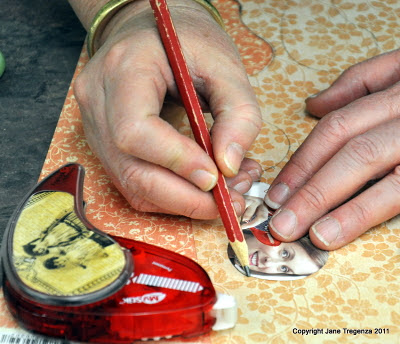

 Spray around the top of the dark petal with water and fold it. Add some tape to the bottom middle of your petal and add to the first petal. Add another dark petal to make the middle of your rose.
  Once you have four dark petals, you can start adding pale petals.
  Put some tape halfway down the middle of the petal and each side of the bottom of the petal and wrap it around the last one. Keep repeating until your rose is big enough. You will need to pinch the petals to help them fit. Don’t worry if they tear as you can touch them up with a bit of ink.
 I made three roses and added them to my hat. I tucked some organza ribbon in green to lift the roses and to hide the end of the roses. I added two peacock feathers from
  I will post some photos of the Girls Night In with me wearing my Hat.
 Blog:
Blog:  I received a box today from
 I was disapointed with how mine photographed. I cut a hole in the middle of my bag so as you filled it, you could see how many sweeties (candy) was in the bag! I used lots of chipboard from Imaginarium Designs. I love the house on top of the Witch, don't forget to leave a comment to win.
 I was wrapped to receive from Fiskar’s some of their punches for a blog hop. I am a big fan and love the border punches.
  They kindly send me two borders and a squeeze punch. The squeeze punch was in the shape of a postage stamp. Perfect for me as I love stamps.
 First I used the ribbon threading punch, I punched a strip of paper 12 inches long and threaded some apricot satin ribbon through it. It was so easy to do.
 I got a bit carried away and ended up with two more punched border pieces. The punches work so well and are easy to line up, allowing you to create a continues line of bordered edges on your papers. I love the way using border punches allow you to add lots of detail to your layouts without bulking the page out too much.
 I used Enchanted Forest for the base of my layout. I layered all the punched strips on the page. I added more ribbons to hide any joins.
 Another frame to the right of the layout balanced it nicely. I added some Prima pearls to create a flight path for the butterflies!
 I used the photo squeeze punch from Fiskar for my title squares. It nearly fitted the” tiny treasures” postage squares printed on the paper perfectly. I added smaller square of pink “Spellbound” in the middle and some chipboard alphas to spell Anna’s name.

 I used the back of Goblin Gazette for the base of the layout.


